
Outlook for Mac is the tool provided by Microsoft for Apple users to use the Outlook application. Users can perform all the functions as those of MS Outlook, but with certain specifications. The email management is responsible for a single file that is PST, but for Outlook for Mac, it is OLM. When a user is not able to send or receive emails in Outlook for Mac, it shows the error code 150. Here, we will know the causes and how to fix the Outlook for Mac Error Code 150.
When sending a mail fails, it displays the error code ‘An unknown error has occurred in Outlook, couldn’t retrieve mail, Account Name: “Your mail”, Error code: 150’. Sending and receiving mail is the basic feature, and if it fails, we cannot get important messages in our inbox, which may cause a huge loss to the organization. 
For Outlook errors in Mac, one can fix them manually for free or use the Outlook for Mac tool. If the cause of the error is known, then it could be recovered without any errors. The major reasons for Outlook error 150 are
- Corrupt file in Outlook
- Virus attacks or malicious files in attachments
- Outlook is not installed properly
- Outlook for Mac is not updated completely
- A slow internet connection is causing a hindrance in message sending
- Outlook mailbox is full
How to Resolve Outlook for Mac 150 Error Code
Fix the Outlook error 150 by following the steps given below. Before beginning, ensure you have a proper internet connection, then resolve it by following the steps
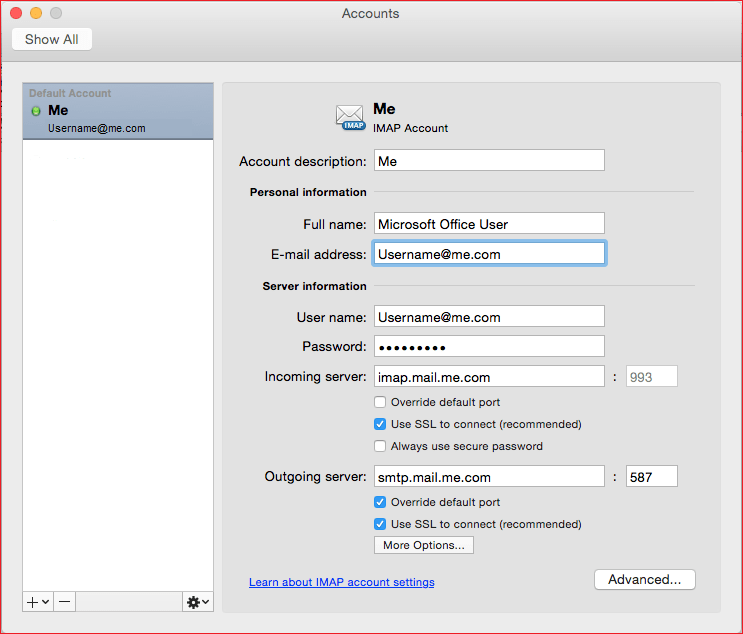
- Sign in to Outlook with your username and password
- Go to Outlook Settings and select Preferences
- Click on the Comcast option and then delete the current Outlook account
- Once it is done, add the Outlook account, and click on the + sign to add. One thing to note is that Comcast is set to default
- Go to Outlook settings and check for the available accounts
- Select the account that you want to add
- After the account is added, delete all the emails, folders, junk, and temporary folders
- Restart Outlook for Mac, and it will open without error.
So, your Outlook for Mac account is back to normal, and you can use it without any problems. But the manual method is complex, and as it includes the deletion of files, it could delete important data too.
Download Stellar OLM Repair Tool
The OLM Repair has a recovery engine that scans the OLM files and identifies the error. If the OLM file has an error code 150, then it repairs it and gives the option to save in multiple formats. As you need to use it with Outlook for Mac, save it in that format and repair the error. In this way, the Stellar Repair for OLM fix Outlook for Mac 150 error code and preserves the data